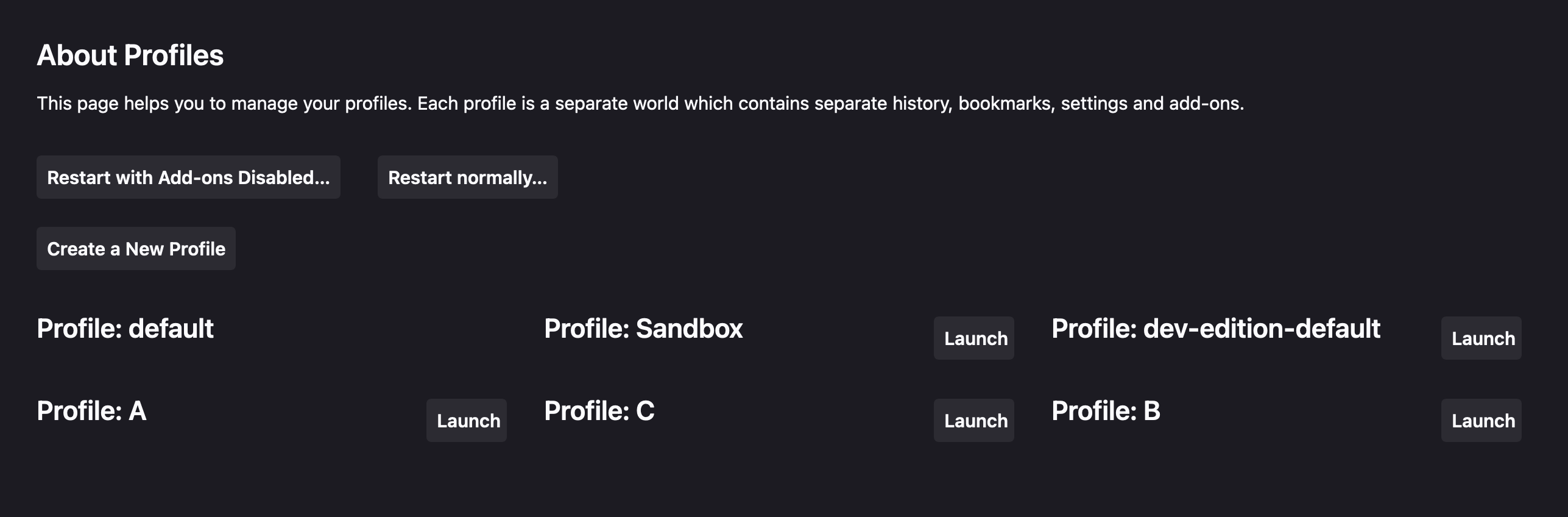
Firefox allows us to create multiple browser profiles to separate our activities, such as work, personal, finance, etc. It has an about:profiles page to manage and launch these. The page has not gotten much UX love and does not make very good use of space. On load, I can't see the full second profile on my laptop (Macbook) screen. After living with this a long time, I decided to use userContent.css to customize the appearance so everything fits on one screen and I can quickly and easily find the two things I need most of the time: Each profile's name, and the button to launch it with.
userContent.css is a file in the folder of a given profile at {profile}/chrome/userContent.css (see David Walsh's instructions if you need help setting this up) that allows us to customize the styles of any pages loaded through Firefox with that profile. I used the selector #owned #profiles to target elements, since this combination of IDs is not likely to be on other pages (the styles are applied to every page we load). I got to use some of the fancy newer CSS features like has() and nesting, since I know this browser supports them.
Changes
Because we can only modify the CSS of the page, not the HTML structure or scripting, there are limits to what we can do. I did several main things to make a very compact screen:
Reducing whitespace, shrinking or removing things
html:has(#owned #profiles){
	/*--smaller text, less whitepspace */
	--font-size-root: 13px;
	--button-min-height: 2em;
	h1, h2{
		margin-top: 0;
	}
	#body{
		padding: 2em !important;
	}
	button{
		padding: 0.5em !important;
	}
	/*--make top part less tall */
	.header-flex{
		display: block !important;
		> .action-box{
			background: none !important;
			border: 0 !important;
			display: flex;
			gap: 1.5em;
			padding: 0 !important;
		}
	}
	/*--remove unneeded heading */
	h3[data-l10n-id="profiles-restart-title"]{
		display: none;
	}
}
Having the profile boxes wrap after shrinking the width
#owned #profiles{
	/*--make profile items wrap, smaller */
	display: flex;
	flex-wrap: wrap;
	gap: 1.5em;
	margin-top: 2em;
	> div{
		flex: 1 1 25em;
		position: relative;
	}
}
Hiding the profile box content except for the name and launch button, until focused
#owned #profiles{
	> div{
		max-height: 3em;
		overflow: hidden;
		transition: max-height 0.2s;
		transition-delay: 1s; /* reduces issues moving mouse to launch buttons */
		&:hover, &:focus-within{
			max-height: 18em;
		}
	}
	/*--move launch button to top left */
	button[data-l10n-id="profiles-launch-profile"]{
		min-width: 3em !important;
		overflow: hidden;
		position: absolute;
		right: 0;
		top: 0;
		white-space: nowrap;
		width: 4.4em;
	}
}
So
I had to use !important sometimes when I couldn't otherwise get my styles to override Firefox's. The slide open of the extra box content can be annoying and could be improved with JS or a <details> element, if we had those powers.
This has made for a fairly nice and compact interface that I much prefer to what's built in. This is a bit fragile: If Firefox modifies this page, things could break. Hopefully, Firefox will eventually get around to improving this themselves, but for now, this works for me.